In the world language classroom, it is critical to get students talking and listening to one another. Here are twenty grouping strategies to encourage teamwork, team building, a positive class culture, and communication. I'll be sure to do another post on group work structures, which help to make many of these grouping strategies more effective.
1. Permanent seats: Groups of 4. Choose groups carefully; each group should have a student leader and be diversified for skill level and student characteristics. I found it best to have a high-performing student with two typically middle-level students and one lower-skill student. The higher and lower should not be next to each other. Place students strategically so that best friends are separate or across the room facing in opposite directions. A group of four allows for interactions with three different people, easier management, and creates an environment focused on student-centered learning. I never liked groups of three, and would rather have a group of five. I occasionally used groups of six, but found groups of four to be the most productive.
2. Group by learning preference or learning style. Give students a learning styles survey; for certain activities, put students in groups based on how they learn, and give them an activity that suits this learning style.
3. Skill level. Based on a pre-test, group students for activities designed to match their mastery of objectives. These groups are flexible and will vary each time.
4. Interest. What do students want to learn about and/or what is their focus for a project? For example, group the students who love skateboarding to create an advertisement for their favorite skateboard park.
Random groupings
These can be tailored to fit the unit of study and can be more complex for each level. Students get into one line by communicating solely in the target language. These groupings can last three minutes to an entire class period, depending upon the activity. You can then break students into smaller groups to suit the needs of the activity, maybe groups of two or groups of four, or even larger. Ideas for random groupings:
5. Hair color. A way to review appearance vocabulary.
6. Deck of cards. You can sort students by card grouping or by suit.
7. Number of siblings. Review of family.
8. Rating scale. Ask students - how they feel about certain topics, and rate from highest to lowest. In level 1, it could be "pizza." In a higher level, it could be a question about which cultural practice is preferred. You could do a number of questions like this in a row, and ask students to make comments in the target language throughout the activity.
9. Number of buttons on an article of clothing. A fun way to review clothing and create conversation.
10. Mood for the day - happy to grumpy. This would be a great way to connect with students on a personal level.
Get them moving!
These are groups that allow students to get out of their seats and having conversations with each other.
11. Inside/outside circle. Line students up facing each other; I usually ask that they "high five" so they are certain who their partner is. Give them a prompt or a survey to complete. Rotate to communicate with different partners.
12. Four corners. Ask students to choose one of the four corners in the room, where you have placed different labels. Again, this can vary by unit of study. Favorite season in level 1; weekend rating scale in level 2; favorite character from a story in level 3; most important environmental issue in the target country in level four. You could then give students a task or conversation questions.
13. What's your favorite....? Place a different picture on each group of four. As students walk in, have them select their "favorite" of the series. Then, give them a series of questions to discuss or answer within that group.
14. Stations. Make each table of four desks a different activity. Require students to complete, for example, any five of those activities. They can move on as they finish. Ideas for stations: Listening station, game review, reading activity, practice quiz, computer task, etc. Or you could have stations to learn about a time in history, such as music, literature, or historical figures.
15. Gallery walk. You can use this for students to produce work or to review and discuss each other's work. To create work, put a number of large posters around the room, either on each table of four or on the wall. Ask students to fill in vocabulary about a topic, or give a one-word answer to a question. Groups can rotate as they finish or based on a timer. To review work, ask students to place their work in visible places, and then discuss with a number of classmates. A worksheet is helpful for students to write their feedback.
Ideas for groups of four
16. Student-chosen groups. I would rarely let students choose their own groups (except for interest-based activities), but would do it on occasion. I found this a helpful "carrot" for getting students to finish certain activities.
17. Conversation tables. Put a tented paper on each group of four with questions for students to ask and answer of each other. You can ask students to record a partner's answers or assign a recorder the task of summarizing group responses.
18. Dice. I loved to give prompts with dice. On the board, 1-6 would each have a different task, and occasionally, a second die would have different characters. Students complete the random prompt based on chance.
When all else fails...
19. Who's your favorite____(team? singer?)? Create teams based on student responses to preferences, such as "Yankees or Red Sox?"
20. Ask the students for ideas! Give them an exit slip to create different groups. You will get many ideas from them.
I hope these grouping ideas can improve your class culture, energize your students, aid learning, enable teacher facilitation, and increase communication. What grouping strategies have you used in your classroom?
Showing posts with label students. Show all posts
Showing posts with label students. Show all posts
Sunday, April 27, 2014

Monday, January 27, 2014
Two Truths and One Lie for French 1
Students in my school began learning second languages at age fourteen.
The first day of French 1 was seriously a hoot FOR ME. Me: Verbal and physical gymnastics. Students: Bewilderment and occasional joy. It took me a few years to register how overwhelming this new subject and new type of learning could be.
I then settled on teaching students these three ideas (in French, with pantomiming), from the beginning. The first days got better and better after this change. Here are the three most important things for students to realize from day 1 of level 1:
TRUTH #1: Confusion is normal when learning a new language.
When I started expressing this idea to students, I saw immediate relief and the release of anxiety. I tell students to try to get "the gist" and tell them that, at the beginning, understanding even 10% is a victory.
TRUTH #2: You will never understand everything that is said in this world language class (AKA - the confusion never ends). This is connected, of course, to truth #1. However, this becomes more important over time. Students need to know that the learning process in a second language requires that their language skills be constantly stretched. The classic i + 1.
LIE #1: This is not my lie - but...I reveal that the student who seems to understand everything is...FAKING IT. That student who nods and smiles and seems confident is...also lost.
What do you do to help your beginning language learners?
The first day of French 1 was seriously a hoot FOR ME. Me: Verbal and physical gymnastics. Students: Bewilderment and occasional joy. It took me a few years to register how overwhelming this new subject and new type of learning could be.
I then settled on teaching students these three ideas (in French, with pantomiming), from the beginning. The first days got better and better after this change. Here are the three most important things for students to realize from day 1 of level 1:
TRUTH #1: Confusion is normal when learning a new language.
When I started expressing this idea to students, I saw immediate relief and the release of anxiety. I tell students to try to get "the gist" and tell them that, at the beginning, understanding even 10% is a victory.
TRUTH #2: You will never understand everything that is said in this world language class (AKA - the confusion never ends). This is connected, of course, to truth #1. However, this becomes more important over time. Students need to know that the learning process in a second language requires that their language skills be constantly stretched. The classic i + 1.
LIE #1: This is not my lie - but...I reveal that the student who seems to understand everything is...FAKING IT. That student who nods and smiles and seems confident is...also lost.
What do you do to help your beginning language learners?
Sunday, June 30, 2013
Tips for Incorporating Technology Into the Classroom
I love using technology in the classroom. Here are some tips for its effective integration, especially for teachers who are just beginning to utilize these important tools.
1. Start small. Begin with one assignment with one website. Based on student feedback and results, your knowledge and use of technology will slowly increase over time.
2. Demonstrate the technology the first time. For example, if giving a “flipped” assignment, review the rubric and how to access the materials online, or if using Voki (www.voki.com), do the first assignment together using a class set of computers. That being said, I do not always “hand hold” the use of technology. Students always amaze me with their ability to figure things out. I also privately approach learners I suspect may need assistance.
3. Utilize a technology “home base.” Creating a class website where students can access project links and materials makes it easier for students to complete assignments. It is also a good idea to post project rubrics and templates so that tech-savvy students can type them instead. Over time, this “home base” will evolve and grow.
4. Embrace that most students know more about technology. When I give technology workshops, many teachers are overwhelmed with mastering the intricacies of websites and are afraid they will be unable to answer student questions. Embrace that students know more, and encourage them to teach each other and you, the teacher. This can greatly improve class culture, and the act of “letting go” demonstrates to students that you, too, are a learner.
5. Let students do the work. If you want to create a series of videos for classroom use, assign them to students in small groups. Later, save those videos to use with other classes. Be sure to preview the videos before showing them to the entire class!
6. Ask students their opinions. Some of the best assignment ideas come from students. I often explain to students my idea for projects, then ask them how to make them more engaging and relevant. Listening to their input can lead to greater choices within the assignment, and ultimately, more completion and better products.
7. Give students choices for format. When assigning presentations, videos, or other projects, let students choose the technology. Instead of, for example, requiring the use of Prezi (www.prezi.com), Voicethread (www.voicethread.com), or Animoto (www.animoto.com), let students select the best way to meet the assignment criteria. As part of the project rubric, require that students email you the link. (I would also, at times, give learners non-technology options too.) Choice is a powerful motivator and a tool for creating independent learners.
Important tip for world language teachers:
Teach students how to put accent marks into a variety of documents and web-based tools using laptops, desktop computers, tablets, and cellphones.
Wednesday, June 19, 2013
Using Mobile Devices with Socrative Replaces "Clickers"
Socrative (www.socrative.com) is a free website for assessments that can be given via computer or with mobile devices.
How does it work?
Sign-up is easy and free. Below is a picture of the dashboard, which gives teachers the option of preparing questions in advance, asking one question orally and having students respond, giving pre-designed items, or using and editing quizzes created by other users.

How do students access the questions?
When creating an account, teachers receive a room number that never changes. In order to take the assessments, students login to the student portal through http://m.socrative.com/student/#joinRoom or by clicking on www.socrative.com using the teacher room number. (See the image below.)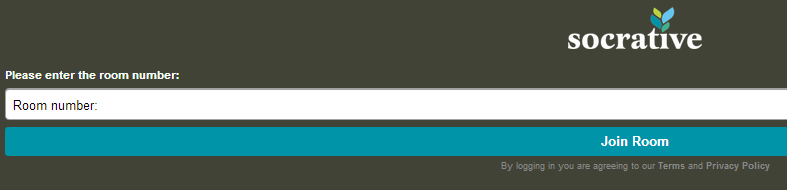
on www.socrative.com using the teacher room number. (See the image below.)
What’s great about Socrative?
- No student emails or accounts. Students only need the teacher room number to access the materials.
- Downloadable results. For every assignment, students must enter their names. When the assessment in finished, teachers can download student responses.
- Oral questions. Unlike on similar sites (such as www.polleverywhere.com), teachers can ask a question orally or use pre-made items, such as the exit ticket.
- Multiple questions. Assessments can be made with a number of items.
- Computers or mobile devices. Students can respond with a computer or cell phone; if there are not enough devices in a class, different students are able to take the assessment on the same device.
Caveat Emptor (Does that apply to something that’s free? But I digress...)
- Teachers must start quizzes for students to access them.
- Only 50 users per activity.
- Requires the internet.
- Survey results are not “pretty” and in real time like they are on PollEverywhere.
Ideas for Socrative
- Poll students at the beginning of class about the order of class activities.
- Ask students to create quizzes for the class as a homework assignment; use this as an opening activity.
- Ask questions that resemble those on an upcoming quiz and use the data to plan a review class and to group students for activities.
- Exit tickets. Use this feature to get feedback on class activities.
- How is class going? Survey students on your performance or their performance, and use the results to shape class structure.
- Interest surveys. In order to discuss concepts in class, create interest surveys, then students share and analyze the results in small groups.
Review in a nutshell: Although the dashboard is a tad clunky, Socrative is great for formative assessments that inform classroom instruction, and it makes “clicker” systems unnecessary.
Sunday, June 16, 2013
Padlet: Online Wall for Collaboration
What it is: http://padlet.com/ is a website that allows users to build a wall that can be written on with “sticky notes.” Users can post to the wall, adding words, links, pictures, or documents. Each wall has a unique URL that can be customized to be easier to find or to remember.
Some questions and options to consider when building your wall:
- Backgrounds: Which fun background will you choose?
- Positioning of posts: Do you want them random or ordered? (I personally like them haphazard.)
- Access: Which visitors can access your wall? Email invites only, password protected, public, or public and hidden?
- Power Can visitors view, add to, or edit the wall? Will posts be moderated?
- Location: Will you embed your wall into your webpage or blog or share the link?
What I like:
- Padlet is great for brainstorming or collaboration in real-time
- Users can create walls without accounts (but it is easier to track walls with an account)
- Walls can be password protected and moderated
What I dislike:
- Documents added to the wall are turned into pictures, so Padlet is not for document storage
- As each wall is only one page, they are best used for just one assignment
- In the past, I found that walls or “Wallwisher” would occasionally be unavailable, though I have not found that to be the case since this site became “Padlet”
Ideas for the World Language Classroom:
- Brainstorming session. Give students a theme, like “vacations,” and ask them to add words, expressions, sentences, or paragraphs related to the topic. This can be done in class while all in the computer lab, or at home for a homework assignment
- Project presentation. Instead of a typical poster, student groups can use this wall to create a visual accompaniment to their project. .
- Class opener/closer. Begin or end a class (perhaps in the computer lab) by surveying students on their learning or interests
- Question(s) about reading. Post questions about a homework assignment, and require students to answer the question and also respond or comment on the posts of classmates
- Advertising campaign. Students create an infographic to convince users in the target culture to use a product
Review in a nutshell: Padlet is an easy-to-use, visual tool that is a great jumping-off point for online collaboration
Sample walls (from the Padlet website):
Wednesday, May 22, 2013
Infographics: 5 Ideas for the WL Classroom
Infographics are a great way for students to create and present with the target language using twenty-first century skills. To ramp up those skills (www.p21.org), ask students to collaborate in groups. These ideas also support the ACTFL 5 C’s (www.actfl.org) and the Common Core (www.corestandards.org).
1. Class poll/results. Students create a poll or survey for the class in order to solve a class problem (www.polleverywhere.com, www.surveymonkey.com, www.pollthemob.com, www.mentimeter.com), give the survey, collect the results, then report them to the class, in the target language, using an infographic.
2. Autobiography. Students create an infographic describing themselves in numbers. The infographics are presented in the target language in small groups or in front of the entire class. In the autobiography, students explore an issue of interest in the target culture that they are researching on their own.
3. Global warming: Statistics and solutions. Students investigate an environmental issue in the target culture and create a solution. Both the problem and the solution can be displayed using an infographic.
4. Class trip. Students plan a class trip two places in the target culture. The budget is prepared and explained for each place, and they are compared in the infographic. The class evaluates the benefits of each trip and votes on a selection.
5. Story explore. Students create an infographic to summarize and evaluate a story read individually in class. Characters or locales in the story can be explained. In small groups, students share their infographics, and then students choose two additional stories to read based on the infographics of their peers.
Sample infographic, courtesy of @nerdgraph
Some Infographic websites:
Helpful links:
ACTFL 5 C’s Executive Summary:
Common Core:
Saturday, May 18, 2013
Voicethread in the World Language Classroom
Voicethread is an engaging website where users publish content with pictures and words or voice, and then others can add comments with either words, voice, or drawings on the presentation. Users can limit who can comment on presentations, are able to moderate comments, and can make the voicethreads either public or private.
How I used it:
I mostly used Voicethread to introduce vocabulary in the world language classroom. I created my first voicethreads by uploading the images from PowerPoints I had on file. A few days before formally introducing a new unit, I would give students an assignment to use the new vocabulary word or expression on the “slide.” Instead of focusing on accuracy for this assignment, I focused on communication of ideas. Students had to write an original sentence and were encouraged to connect to prior comments. Later, using my Smartboard in class, we would review the comments in the target language. The online connections, combined with the high school sense of humor, created many funny minutes in the classroom. A sample activity and rubric are below.
What I liked:
- Asynchronous online communication
- Many students were “braver” in French because it was online and they were able to plan their sentences
- Improved vocabulary memorization
- Students were able to make voice comments, important in the world language classroom
- There is a Voicethread app
What I disliked:
- The technology was not as intuitive as others used in the classroom, so some students needed assistance.
- Users are required to “login” with email, which did not jive with district policy; so we paid for student accounts ($1 each) to allow sign-ins without email. This process was not obvious.________________________________For homework, you must: Answer the questions on each picture.Directions:1. Go to my web page for school2. Go to “French 3”3. Go to “Assignments”4. Click to add comments; you will be prompted to login; follow the prompts.How you will be graded:# of commentsQuality of comments10 points6 Creative use of language, using a variety of vocabulary and expressions from French 1-3 You use the vocabulary expressions appropriately. Few errors; they do not interfere with your message.8 points4-5 You use the vocabulary expressions appropriately. Few errors, 1-3 may prevent communication of ideas.6 points1-3 You use the vocabulary expressions appropriately, but a bare minimum. 4+ errors prevent communication of ideas.
Subscribe to:
Posts (Atom)