Showing posts with label professional development. Show all posts

Thursday, July 10, 2014

Beginner's Guide to Padlet

Although I've posted about Padlet before, I couldn't resist sharing materials I recently created for a presentation.  (Interested in a screencast about Padlet?  Check this out, created by my friend Jennifer Plourde.)

What is Padlet?  http://padlet.com/ is a website that allows users to build a wall that can be written on with “sticky notes.”  Users can post to the wall, adding words, links, pictures, or documents. Each wall has a unique URL that can be customized to be easier to find or to remember.
Want to write on a Padlet?  Add a post here!  To post, just double click anywhere on the page.  The top part of the note is  for your name, and the bottom part is for the answer to the question. 
Check out my last post about Padlet, which includes ideas for classroom use.

1.  Making an account


2.    Complete your profile.  Please note that user names need to be fewer than 15 characters. 


3.  The Dashboard


4.  Making a wall:  Create the Padlet

5.  Modify Your Wall (Part 1)

6.  Modify Your Wall (Part 2); Click “modify wall” or the gear to see the menus below


7.  Modify Your Wall (Part 3):  Privacy

8.  Some Considerations
  • What is the purpose of the wall?  For a warm-up in the computer lab for example, you will not want to moderate posts, and can set appropriate expectations for posting.
  • Do you want to password protect the wall?
  • Do you want to link the page to your school website so that students can have easier access to the page?
  • What sorts of projects could students create using padlet? 
  • Do you want to embed a padlet on your web page?
  • Do students know how to make accent marks for posting?
  • Documents become pictures, so this is a great way to share documents but does not work well for document storage.


    • Saturday, April 19, 2014

      10 Pieces of Advice for New World Language Teachers

      1.  Start with classroom management on day 1.  Routines and procedures are CRITICAL for classroom success. 

      2.  Begin using (mostly) the target language from day 1.  It is possible!  You can do it!  Act things out and use drawings. 

      3.  Trust your instincts.  As a first-year teacher, you are finding your footing; trust what your gut tells you to do.  It will take time to develop your own teaching style, and it begins by being true to yourself.

      4.  Listen to your students.  If students offer suggestions and ideas for improving, take them. 

      5.  Find the best teachers in your school and become their friend.  It is important to surround yourself with uplifting teachers who can guide you to success.

      6.  Use the mentors and help offered to you.  Being a new teacher is overwhelming.  Accept offers of help and ask for it.

      7.  Use the curriculum and/or materials created by your world language colleagues.  It is easier to edit than to create; you need to begin somewhere. 

      8.  Know that you are not a super hero.  One of the difficult parts of being a new teacher is working with veterans with much more experience than you.  You will have that knowledge too (one day), just not in your first year.

      9.  Be nice to everyone.  Smiles and kindness lead to genuine connections with students, faculty, and staff.

      10. Become a part of your school community.  Attend games, send cards for big announcements, and go to wakes for those within your school.  You will become part of the school's fabric and improve the school culture too.

      Wednesday, November 20, 2013

      Twitter: A beginner's guide

      Is Twitter a time waster in 140 characters?


      Thomas Sauer, the keynote speaker at the recent Connecticut Council of Language Teachers conference, encouraged all participants to make connections on Twitter.  During the conference, he used technological magic to show a screen of tweets about the conference happening in real time:


      Is Twitter worth your time?  ABSOLUTELY.  Twitter is outstanding because it allows users to connect via smartphone or a computer and it requires little investment.   A few minutes here or there, and you can improve your teaching and help others to do the same.

      Here is a Twitter primer


      What are the benefits of Twitter?
      It is anytime, anywhere professional development tailored to your personal needs.  

      What is a tweet?
      A tweet is a public micro-blog that is limited to 140 characters.  Most users share quick thoughts, their own content, or link to other content on the web.  Users can also “retweet” materials shared by others or contact people directly.  All sharing on Twitter is limited to 140 characters.  Here is one of my recent tweets: 
       

      In this tweet, I shared a link to a blog post by Matt Miller and tied it to the topic “#edtech.”

      What is a hashtag?
      Hashtags (#) allow users to search tweets by topic.  When I tweet, I include the hashtags (usually 1-3) that are relevant to the post.  By clicking on “#edtech” in the above post or by searching that hashtag, all users will see the tweets tagged with this topic. 

      What are those “@” symbols?
      All users on Twitter have an address with an “@” before it.  My address is “@RobuPrice.”  If you wanted to send a public tweet to me, you would include “@RobuPrice” in your tweet. I would then receive a notification that you contacted me.  It is common etiquette on Twitter to acknowledge the creator of content.  In my sample tweet above, I gave a “shout out” to “@jmattmiller,” who wrote the piece.   

      Should I use my real picture on my profile?
      Yes. 

      What are “chats?” 
      There are weekly “chats” on a number of topics.  For example, there is an “#edtechchat” on Monday at 8 p.m.  A variety of users tweet and have an online conversations about a topic using the same hashtag.   

      What does it mean to follow someone or to be followed?
      When you “follow” someone, you see his/her content shared in your newsfeed.  When someone follows you, they see your tweets in the same fashion.

      Recommended follows
      ·         @tmsaue1 – Thomas Sauer, the keynote from the CT COLT Fall Conference
      ·         @CT_COLT – The Connecticut Council of Language Teachers
      ·         @CoLeeSensei – Japanese teacher trying to incorporate tech into her teaching.  One of the #langchat (Thurs 8-9pm EST) moderators
      ·         @lindseybp – The account of the former CT COLT President, Barbara Lindsey
      ·         @msfrenchteach – A high school French teacher who shares her blog and insights about WL teaching and learning
      ·         @SenorG – Noah Geisel, the ACTFL 2013 Teacher of the Year (a Spanish teacher)
      ·         @trescolumnae – Justin Schwamm, Latin Teacher

      Typical hashtags
      ·         #edchat – A discussion of all topics connected to education
      ·         #langchat – World language teachers post articles and discussions
      ·         #mfltwitterati – For those who love modern foreign languages

      Twitter review in 140 characters
      Create your own PLC and access it while standing in line at the grocery store or waiting for a friend to arrive at dinner.  #twitterrocks

      Tuesday, May 28, 2013

      Why I Love Diigo

      And the answer is....Easy-to-access web-based bookmarks organized by tags. Yahoo!


      I hated...My bookmarks on my work computer, organized by folder.  It was hard to find the resources and they were accessible in only one place.  


      My life was changed....There are web-based bookmarks.  GENIUS! Diigo (www.diigo.com) and Delicious (www.delicious.com) are the most popular.  My bookmarks would be accessible from anywhere with internet access.  


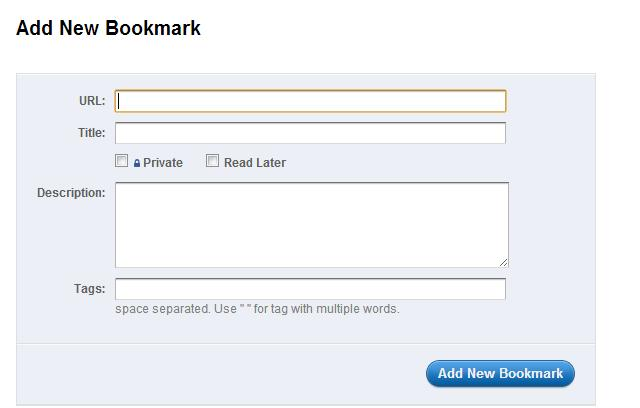
      And then I added bookmarks...I added my favorite favorites (see image below). With Diigo, I was able to add the URL, a title, mark the bookmark as “private” or “read later,” a description, and most importantly, choose TAGS.  Later, I learned to copy the bookmarks of others.   


      And I left my bookmarks public!  Students, parents, colleagues, etc.,  can access my bookmarks.  I can also embed the link to my Diigo page on my school webpage. wiki, or blog.  https://www.diigo.com/user/robuprice


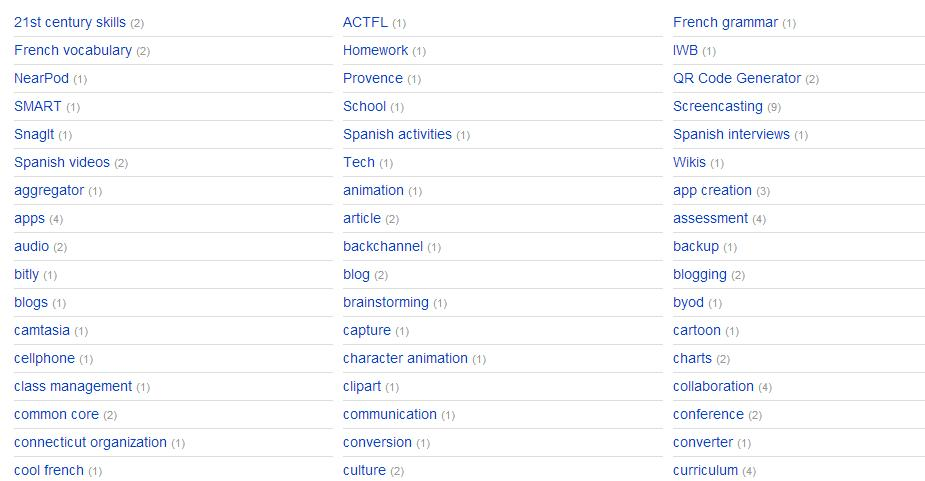
      My tags
      I can now find all of my bookmarks by their tags.  Webpages can have multiple tags, so can be found or grouped in a number of places. Here is a peek at some of my “tags:”


      Ideas for the WL Classroom:

      • Teacher “tags” web pages for students to use for review, assignments, or independent practice.  Items can be tagged by:
        • Unit
        • Chapter
        • Topic
        • Homework assignment
        • Learning preference
        • Skill
      • Students can create a Diigo page for a topic, in the target language, as a classroom assignment.